

Pretty Logging
The @crowlog/pretty CLI formats JSON logs for human-readable output during development. It's inspired by the popular pino-pretty but tailored for Crowlog with minimalism and performance in mind.
Installation
Install globally or use npx:
bash
node app.js | npx crowlog-prettybash
pnpm install -g @crowlog/prettybash
npm install -g @crowlog/prettybash
yarn global add @crowlog/prettyUsage
Pipe JSON logs through the pretty formatter:
bash
# Node.js
node index.js | npx crowlog-pretty

# tsx
tsx watch index.ts | npx crowlog-pretty

# From file
cat logs.jsonl | npx crowlog-pretty

# PM2
pm2 logs --raw | npx crowlog-pretty
Features
- Colored output: Different colors for each log level
- Timestamp formatting: Human-readable timestamps
- Data formatting: Pretty-printed JSON data
- Namespace highlighting: Easy to spot log sources
- Error stack traces: Formatted for readability
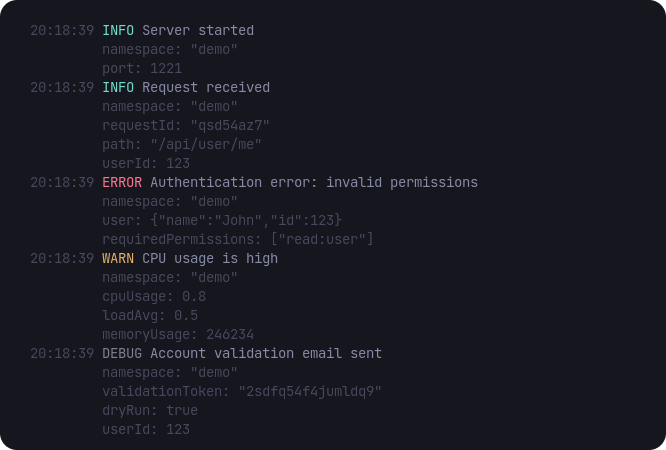
Example Output
Here's an example of pretty-printed logs:
Development Workflow
Use pretty logging in development:
json
{
  "scripts": {
    "dev": "tsx watch src/index.ts | crowlog-pretty",
    "build": "...",
    "start": "node dist/index.js"
  }
}
bash
# Development: pretty logs
pnpm dev

# Production: JSON logs
pnpm start